Google Chrome is a browser that combines a minimal design with sophisticated technology to make the web faster, safer, and easier.
Some features of Google Chrome:
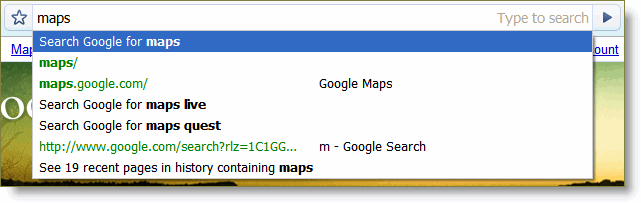
 One box for everything
Type in the address bar and get suggestions for both search and web pages. In Google Chrome, you can get anywhere on the Web with one box. The address bar that sits at the top of the normal Google Chrome window simplifies your Internet experience by doubling as a search box. You can also use it to bookmark websites and stay aware about the security of a website.
Thumbnails of your top sites
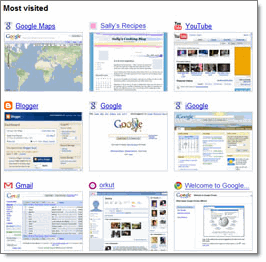 Access your favorite pages instantly with lightning speed from any new tab. Every time you open a new tab, you'll see a visual sampling of your most visited sites, most used search engines, and recently bookmarked pages and closed tabs.
Shortcuts for your apps
Get desktop shortcuts to launch your favorite web applications.
Many websites, such as email services, operate like actual programs, similar to those on your computer desktop.
Open these websites just like any other programs on your computer. Create an application shortcut for the website you're on:
- Click the Page menu
 .
. - Select Create application shortcuts.
- In the 'Google Gears' dialog box, select the checkboxes where you want shortcuts to be placed on your computer.
- Desktop
- Start menu
- Quick launch bar
- Click the OK button.
 .
.Dynamic Tabs
You can drag tabs out of the browser to create new windows, gather multiple tabs into one window or arrange your tabs however you wish -- quickly and easily.
Crash Control
Use the Task Manager to get details about a specific process running in Google Chrome, or to force a misbehaving tab or application to close.
For each active item in Google Chrome, you can monitor the amount of memory taken up, the amount of CPU used, and the network activity (bytes sent and received).
To force a misbehaving webpage or application to close in Google Chrome, select the webpage, then click the End process button. Try reloading the tab to see if the error persists.
It look like Task Manager in windows :D
Incognito mode
For times when you want to browse in stealth mode, for example, to plan surprises like gifts or birthdays, Google Chrome offers the incognito browsing mode. Webpages that you open and files downloaded while you are incognito won't be logged in your browsing and download histories; all new cookies are deleted after you close the incognito window. You can browse normally and in incognito mode at the same time by using separate windows.
When you are browsing form internet in incognito mode, all yours infomation will be deleted after you closed google chrome window or the tab you're now using. Oh my god, this new feature will be the best for who have children an dont want them to be shown web pages look so sexy or porn site that their parents accessed.
Safe Browsing
Google Chrome displays this warning if the web address listed in the certificate doesn't match the address of the website Google Chrome is attempting to access.
 When you connect to a website that uses SSL to transmit data, the server which hosts that website presents Google Chrome and other browsers with a certificate to verify its identity. This certificate contains information such as the address of the website, which is confirmed by a third party organization that your computer trusts. By checking that the address in the certificate matches the address of the website, it's possible to verify that you're communicating with the website named on the certificate, and not someone pretending to be that website.
Instant Bookmarks
When you switch to Google Chrome, you can pick up where you left off with all the bookmarks and passwords from your existing browser
Import Settings
You ca import all setting about Web history, cookie, session ... from Mozilla Firefox, IE ... to Google Chrome anytime you want. You can pick up where you left off with all the bookmarks and passwords from your existing browser.
Simpler Downloads
Download Manager built in Google Chrome make dowloading become easily and simply more than other browsers you knew. File after dowload will be display in Google Chrome and you can Open, Drag and drop to desktop or anywhere you want to paste.
So, these features above are main feature of Google Chrome, but sometime Google Chrome still be hardly to work with some java script in many web page. But, this is Beta, can be fix for next version. And ... no reason why not using Google Chrome
Download now, and share all thing that you get from Goolge Chrome.