Showing posts with label Java. Show all posts

Friday, October 24, 2008

5 Useful tools to convert your entire code into Colorized and browsable HTML

Delicious 0
When you open your blog for sharing code, writing programming tutorial, publish a entry about codes, you should colorize, it called convert the entire code into colorized and make browsable with HTML. There are so many ways to do that, you can copy the code into web page design program and make up your code, but you don't know what're the easy ways to do that thing.

 1- Use syntaxhighlighter:

This tool base on java script and stylesheet, the most popular Syntax Highlight tool in the internet, WordPress is now using this tool to highligh the code embebed.
Homepage: SyntaxHighlighter in Google Code
Download: syntaxhighlighter
Usage: manual

I like this tool because it will automatic convert the code after the web browser loaded. Because that, the code will not be formated and you can edit it later easily.

It support so many language: PHP, SQL Query, Java, Python, C# .....It's cool, right?


2- Using PHP's Built-in Source Highlighter:

PHP offer two functions for highlighting PHP code: highlight_file() and highlight_string(). Both functions return the same results, but each has its own specific input parameters. As their names suggest, the first function takes the filename of the PHP script whose code is to be highlighted, while the second takes the input as a string.

A Quick Example
Let's take a look at an example of the highlight_string() function in action:

<?php 
include_once 'init.inc.php'; 

if (!empty($_POST['text'])){ 
   echo '<div style="border: solid 1px orange; padding: 20px; margin: 20px">'; 
   highlight_string($_POST['text']); 
   echo '</div>'; 
} 
?> 


<form action="<?php echo $_SERVER['PHP_SELF']?>" method="post"> 
   <textarea name="text" style="width: 300px; height: 200px"><?php 
       echo @$_POST['text'];  
   ?></textarea> 
   <br /> 
   <input type="submit" /> 
</form>


This script displays a simple textbox into which you can type or paste the PHP code you want to highlight.


3- Java2HTML Converter (for java blog): 

This is also cool converter. Java2Html was write with java language, it converts Java (and other) source code (complete files or snippets) to HTML, RTF, TeX and XHTML with syntax highlighting.
Homepage: Java2HTML Converter
Download: download here

Java2HTML can be used as Eclipse plugin and it's useful for fastly convert in time.

However, after converted, the code will be formated and it'll hardly to edit later if you want to updated your entry.


4- CodeColorizer: Free Tool to Colorize Code in HTML or RTF.

This application allows you to generate HTML or RTF so you can colorize:
  • C#, VB.NET, J#, Javascript, Cobol, Algol
  • HTML, XML, XSLT, .Config
  • T-SQL
  • CSS, and many more...
Homepage: CodeColorizer
Download: download here
Things to notice is that it generates the simplest Html possible to achieve the right formatting. It colorizes in the same place ASP.NET code, HTML, C# code, javascript code, CSS styles, and more...


5-Csharpfriends.com Online Code Formatting:

Online site formatting with following code: C#, VB.NET, J# and T-SQL.
Its useful for who dont want to install any program into computer and dont need to add any code into webpage to do automaticlly, you just do it online, copy and go back to your working
Link to converter: CSharpfriend Online Code Fomartting

If you found some webpages or tools can do something like that, please correct me. Pleased to make you work perfectly.

Thursday, October 23, 2008

Pagination with Hibernate and MySQL

Delicious 0
When you have a large of records in the table database, you need to paging it to avoid load all data records with slow speed. Someone's mistake about pagination in Hibernate with MySQL by using MySQL query normally.

Example below is used to paging by MySQl Query. this query will select first record and limit select to 5 records:

SELECT * FROM table LIMIT 0,5 


And in hibernate if we use this query by normal like below..


public List paging() {
    try {
       String queryString = "from table LIMIT 0,5";
       Query queryObject = getSession().createQuery(queryString);
       return queryObject.list();
    } catch (RuntimeException re) {
       throw re;
    }
}


It's wrong. And it must be:

public List paging() {
    try {
       String queryString = "from table";
       Query queryObject = getSession().createQuery(queryString);
       queryObject.setFirstResult(0);
       queryObject.setMaxResults(5);
       return queryObject.list();
    } catch (RuntimeException re) {
       throw re;
    }
}


setFirstResult(...) is used to select the record number, and setMaxResult(...) is used to select number of records.
Dont be mistake about sql query and Query Object when hibernating with MySQL.

Monday, October 20, 2008

Common Hibernate Errors and Causes

Delicious 0
This entry deals with some problems when do a work with Hibernate, you will get some errors which you can't understand or dont know causes of that errors. Along with the exception or error messages themselves, potential causes of these errors are often listed along with links to additional resources.
To find the error you're looking for, use your browser's Find or Search capability and input a few words that you are seeing in your error message.


1. org.hibernate.hql.ast.QuerySyntaxException: unexpected end of subtree HQL query...
A complete exception would look like:

2007-06-06 10:14:02,953 [DefaultQuartzScheduler_Worker-4] 
  ERROR PARSER::reportError - <AST>:0:0: unexpected end of subtree
  org.hibernate.hql.ast.QuerySyntaxException: unexpected end of subtree [QUERY]
    at org.hibernate.hql.ast.ErrorCounter.throwQueryException(ErrorCounter.java:59)
    at org.hibernate.hql.ast.QueryTranslatorImpl.analyze(QueryTranslatorImpl.java:225)
    at org.hibernate.hql.ast.QueryTranslatorImpl.doCompile(QueryTranslatorImpl.java:158)
...

Probable cause: In the HQL query you have used a collection for a binding (maybe something like an in (:variable), and you have given a collection by using the setParameterList() method. But the collection that was binded is empty.


2. org.hibernate.QueryException: query specified join fetching, but the owner of the fetched association was not present in the select list...

A complete exception would look like:

Exception in thread "main" org.hibernate.QueryException: 
query specified join fetching, but the owner of the fetched
association was not present in the select list 
[FromElement{explicit,not a collection join,fetch join,fetch non-lazy
properties,classAlias=j_addressParent3,role=null,tableName=t_address,
tableAlias=address4_,origin=t_person_insurance
insurance3_,colums={insurance3_.ADDRESS_ID ,className=nl.sodeso.demo.impl.Address}}] [QUERY]

Probable cause: You have a HQL query that contains a join with a fetch option but that join has an owner that does not specify the fetch option, make sure that the owner also has the fetch option.

The following is an example of the problem:

01: select person from Person as person
02: left join person.address as address
03: left join fetch address.country as country

Here you can see that the join on line 03 is a child join of the join on line 02,
the join on line 03 specifies the fetch option but the join on line 02 doesn't.
In this case the join on line 02 should be changed to:
02: left join fetch person.address as address


3. exception: org.hibernate.exception.SQLGrammarException: could not execute native bulk manipulation query

Something in your code will be:


String del = "DELETE VotableNode vn WHERE vn.votingSetBucketId = " + Integer.toString(bucketId); 

session.createSQLQuery(del).executeUpdate();

Probable cause: It's saying that you can't create a bulk delete on a sql query by using hibernate.

The error in this code is that you were executing a HQL script using createSQLQuery method which is completely wrong. You should use createQuery:

String del = "DELETE VotableNode vn WHERE vn.votingSetBucketId = " + Integer.toString(bucketId); 

session.createQuery(del).executeUpdate();
So there's nothing much to say, If you want to make a bulk task like an update of multiple records or a deletion of multiple rows using a simple query, you MUST use a HQL query.


4. Initial SessionFactory creation failed.org.hibernate.MappingException: Error reading resource:app1/contact.hbm.xml

Probable causes: Your file xml config is missing in your classpath.


5. org.hibernate.HibernateException: Illegal attempt to associate a collection with two open sessions. 

from imma


Probable causes: It showed up when I attempt to update an element in a collection; adding to the collection was not a problem, hibernate mapping files are ok and everything else seemed to be in order but the error keeps turning up.

Solution: it turned out that I was preserving a value across requests whose presence cause a select statement to be executed before the update hence the exception.

A little context about the exception mentioned: I was using Hibernate, Spring and JSF. I was trying to update the collection using a JSF managed bean that has a request scope. Note that the hibernate data access object is managed by Spring hence is not (in my setup) part of JSF life cycle.

So with the above scenario, the first request attaches the collection to a hibernate session, subsequent attempts to modify the collection threw up the mentioned exception.

Changing the scope of the JSF managed bean seems to solve the issue.

Updated at 10/28/08 by Nguyen, Lam D

Thursday, September 11, 2008

Watermarking Images in a Java Servlet

Delicious 0
This is a helpful tuotiral about adding watermark into images. Someone wants to upload image to server and watermarks image, read it, it'll resolve your problem. It's not my tutorial, i dont write it, i found it in http://tutorial.jcwcn.com/Web-Design/Java/JSP-and-Servlets/2007-08-03/2591.html, but if you had any question about it, you can ask me, pleased to help you.

Setting up the Servlet
In the web.xml, you will need to configure a filter that will be used to call the servlet. By creating a filter, this will simplify the url used to access the servlet and image. To an end user, the filter will look like part of the directory structure for the image.

The servlet will be invoked when the url contains the pattern /watermark/*. In our example, we will place the images in a directory called photos in the web application directory. To view the image without the watermark, you would use the url http://webserver/webapp/photos/car.jpg. To invoke the servlet, you would use the url http://webserver/webapp/watermark/photos/car.jpg.

<servlet>
  <servlet-name>com.codebeach.servlet.WatermarkServlet</servlet-name>
  <servlet-class>com.codebeach.servlet.WatermarkServlet</servlet-class>
  </servlet>
<servlet-mapping>
  <servlet-name>com.codebeach.servlet.WatermarkServlet</servlet-name>
  <url-pattern>/watermark/*</url-pattern>
  </servlet-mapping>

Getting the File Name
When the servlet is invoked, the first thing we need to do is to know which file is being requested to have a watermark added.

File file = new File(req.getPathTranslated());
if (!file.exists())
{
     res.sendError(res.SC_NOT_FOUND);
     return;
}
The getPathTranslated() method of the HttpServletRequest object provides the file name with the that was specified on the url after the watermark filter. If the requested file does not exist, this will return a not found error.

Loading and Drawing the Image
Next,we will load the image and draw it onto a BufferedImage. It is being drawn on to a BufferedImage to allow us to modify the image by adding a watermark to it before it is sent to the web browser.
ImageIcon photo = new ImageIcon(req.getPathTranslated());


//Create an image 200 x 200
BufferedImage bufferedImage = new BufferedImage(photo.getIconWidth(),
                                                photo.getIconHeight(),
                                                BufferedImage.TYPE_INT_RGB);
Graphics2D g2d = (Graphics2D) bufferedImage.getGraphics();
g2d.drawImage(photo.getImage(), 0, 0, null);
Creating the AlphaComposite
To allow us to see through the watermark, we will create an AlphaComposite. For our example, we will use a value of 50%. Since we are only drawing text in our tutorial for the watermark, we could have easily created a Color object where the alpha level was 50%. AlphaComposite allows more flexibility since it can be used when you draw anything on top of the the source image. So if you want to use your logo as a watermark, the code for blending it with the source image will be the same.
//Create an alpha composite of 50%
AlphaComposite alpha = AlphaComposite.getInstance(AlphaComposite.SRC_OVER, 0.5f);
g2d.setComposite(alpha); 
Drawing the Watermark
Since we have set the AlphaComposite, we now need to draw the text on the source image. For this example, we will set the color to white, enable text anti-aliasing, and a font of Arial Bold 30 point. There are a number of ways you could draw the watermark on the image. For this example, we will simply center the text by determining the sizes of the image and rectangle of the rendered string.
g2d.setColor(Color.white);
g2d.setRenderingHint(RenderingHints.KEY_TEXT_ANTIALIASING,
                     RenderingHints.VALUE_TEXT_ANTIALIAS_ON);

g2d.setFont(new Font("Arial", Font.BOLD, 30));

String watermark = "Copyright ?2006";

FontMetrics fontMetrics = g2d.getFontMetrics();
Rectangle2D rect = fontMetrics.getStringBounds(watermark, g2d);

g2d.drawString(watermark, (photo.getIconWidth() - (int) rect.getWidth()) / 2,
                          (photo.getIconHeight() - (int) rect.getHeight()) / 2);

//Free graphic resources
g2d.dispose();
Creating a JPG
The final step is to write the image to the response output stream as a jpg. To do this, we will use the ImageIO class that was introduced with Java 1.4. The ImageIO class allows you to write an Image object to JPG, PNG, BMP, and WBMP. In Java 1.6, you will be able to write an Image as GIF.

//Set the mime type of the image
res.setContentType("image/jpg");

//Write the image as a jpg
OutputStream out = res.getOutputStream();
ImageIO.write(bufferedImage, "jpg", out);
out.close();
The ImageIO class will write the bufferedImage as a jpg to the output stream from the HttpServletResponse object.
The Results
To access the image, you can place the servlet call in an <img> tag or directly from the URL.
Original Image

 
Watermarked Image

Wrapping It Up
Below is the complete example of creating a watermark on an image from a servlet


package com.codebeach.servlet;

    import java.io.*;
    import javax.servlet.*;
    import javax.servlet.http.*;
    import java.awt.*;
    import java.awt.image.*;
    import javax.imageio.*;
    import javax.swing.ImageIcon;
    import java.awt.geom.Rectangle2D;

    public class WatermarkServlet extends HttpServlet
    {
        public void doGet(HttpServletRequest req, HttpServletResponse res)
        {

            try
            {
                File file = new File(req.getPathTranslated());
                if (!file.exists())
                {
                    res.sendError(res.SC_NOT_FOUND);
                    return;
                }

                ImageIcon photo = new ImageIcon(req.getPathTranslated());

                //Create an image 200 x 200
                BufferedImage bufferedImage = new BufferedImage(photo.getIconWidth(),
                        photo.getIconHeight(),
                        BufferedImage.TYPE_INT_RGB);
                Graphics2D g2d = (Graphics2D) bufferedImage.getGraphics();

                g2d.drawImage(photo.getImage(), 0, 0, null);

                //Create an alpha composite of 50%
                AlphaComposite alpha = AlphaComposite.getInstance(AlphaComposite.SRC_OVER, 
      0.5f);
                g2d.setComposite(alpha);

                g2d.setColor(Color.white);
                g2d.setRenderingHint(RenderingHints.KEY_TEXT_ANTIALIASING,
                                     RenderingHints.VALUE_TEXT_ANTIALIAS_ON);

                g2d.setFont(new Font("Arial", Font.BOLD, 30));

                String watermark = "Copyright ?2006";

                FontMetrics fontMetrics = g2d.getFontMetrics();
                Rectangle2D rect = fontMetrics.getStringBounds(watermark, g2d);

                g2d.drawString(watermark,
                                (photo.getIconWidth() - (int) rect.getWidth()) / 2,
                                (photo.getIconHeight() - (int) rect.getHeight()) / 2);

                //Free graphic resources
                g2d.dispose();

                //Set the mime type of the image
                res.setContentType("image/jpg");

                //Write the image as a jpg
                OutputStream out = res.getOutputStream();
                ImageIO.write(bufferedImage, "jpg", out);
                out.close();
            }
            catch (IOException ioe)
            {
            }
        }
    }

Monday, September 08, 2008

Cannot find ActionMappings or ActionFormBeans collection

Delicious 0
This error occurs when you try to display a JSP before the Struts ActionServlet has been initialized and is active.

read more | digg story

Saturday, September 06, 2008

Common Struts Errors and Causes

Delicious 0
This page contains errors and exceptions commonly encountered during web application development using Struts. Along with the exception or error messages themselves, potential causes of these errors are often listed along with links to additional resources.

I found this post here  and i think it will solve many problems you got when you were creating Struts Application.

To find the error you're looking for, use your browser's Find or Search capability and input a few words that you are seeing in your error message.


Cannot retrieve mapping for action
Exception: javax.servlet.jsp.JspException: Cannot retrieve mapping for action /Login
Probable Cause: No action defined in struts-config.xml to match that specified in the JSP's <html:form action="Login.do".


Cannot retrieve definition for form bean null
Exception: org.apache.jasper.JasperException: Cannot retrieve definition for form bean null
Probable Cause: This exception typically occurs because Struts cannot find the form bean it expects for a specific action according to the mapping in the struts-config.xml file. Most often, this is probably because the name given to the form in the name attribute of the form-bean element does not match the name attribute of the associated action's action element. In other words, the action and form should each have a name attribute that matches exactly, including case. It has been reported that this error has been seen when no name attribute is associated with the action. If there is no name attribute in an action element, no form is associated with the action. Others have reported this error as merely a symptom of something completely unrelated (all too common), but the mismatch of name attributes in the form-bean and action elements in the struts-config.xml file is the usual culprit.


Must specify type attribute if name is specified
Exception: Must specify type attribute if name is specified
Probable Cause:
This error is seen in conjunction with the Struts' HTML FORM tag. As the error message points out, the "name" attribute was used in the Struts HTML FORM tag (<html:form>), but the "type" attribute was not specified for this HTML FORM custom tag.

There are two easy ways to get around this:
  1. Remove name attribute altogether and specify only an action attribute, allowing Struts to figure out the form class from the struts-config.xml file.
  2. If you really want to use the name attribute, then specify the type attribute. This attribute should be set to the fully qualified (full package) class name of the class that is to be used as the ActionForm associated with the action. For example, the class attribute might be specified in the Struts HTML FORM tag as follows:


    <html:form action="someAction.do"  name="MyFormBean"
     class="org.someOrg.someApp.someClass">
    
Related Links: Struts FAQ / View / HTML


No action instance for path /xxxx could be created
Exception: No action instance for path /xxxx could be created
Probable Causes:
Special Note: Because so many different things can cause this error, it is recommended that you turn your error logging/debugging levels on your web server to a high level of verbosity to see the underlying problems in trying to instantiate the action class you have written and associated with the specified action xxxx through an action mapping in the struts-config.xml file.
Your Action class specified in the struts-config.xml file under the class attribute of the action mapping for action xxxx cannot be found for a variety of reasons, including (but not limited to):
  • Failure to place compiled .class file for the action in the classpath (needs to be under WEB-INF/classes with the appropriate directory structure underneath this that matches the package your Action class belongs to).
  • Package spelling or hierarchy specified in your action class itself (using the package keyword) does not match the spelling or complete package hierachy specified for your action class in the class attribute of the action in struts-config.xml. 
Action class specified in the /xxxx action mapping in the struts-config.xml file (class attribute) does not extend (directly or indirectly) from the Action class. In other words, your custom Action class does not extend off the Struts-provided Action class or off of another class that eventually extends the Action class (such as DispatchAction.
Problem in your classpath, such as web server not being able to find ApplicationResources.properties files in the WEB-INF/classes/ directory or specified subdirectory.
Problem in struts-config.xml file with action mapping.
Problem with data-sources.xml file.
Related Links:


Cannot find bean under name ...
Exception: Cannot find bean under name ...
Probable Cause: This is usually seen in association with a problematic Struts HTML SELECT custom tag. The Struts html:select tag behaves differently depending whether one or both of the name and property attributes is specified for its encompassed tags. If the name attribute is specified, whether or not if the property attribute is specified, then a bean matching the specified name will be expected in some scope (such as page, request, session, or application). If the matching bean is not found in any available scope, the error above will be seen.
There are two ways to address this. The first approach is to put a bean in one of the scopes so that the html:options might be associated with it. The second approach is to not specify the name attribute and instead use only the property attribute.


No getter method for property XXXX of bean org.apache.struts.taglib.html.BEAN
Exception: javax.servlet.jsp.JspException: No getter method for property username of bean org.apache.struts.taglib.html.BEAN
Probable Causes:
No getXXXX() method defined for form field with name XXXX.
This can happen if the JSP/Struts developer forgets that the name of the get method will have the same spelling as the value supplied in the Struts tag's property attribute, but that case will be different and is based on JavaBean specification rules. For example, my form class should have a getUsername method if my Struts form-related tag has username as the value for its property attribute. Note the difference in case marked with emphasis on the letter "U."
Related Links:
Case can trip up the matching between get method's name and name specified in Struts tag
http://saloon.javaranch.com/cgi-bin/ubb/ultimatebb.cgi?ubb=get_topic&f=58&t=000163


java.lang.NoClassDefFoundError: org/apache/struts/action/ActionForm
Exception: java.lang.NoClassDefFoundError: org/apache/struts/action/ActionForm
Probable Causes:
This error occurs typically when the specified Java .class file cannot be located in the classpath. If this occurs at runtime of a web application (error shows on browser rather than a rendered page), this typically means that specified class is not in the web server's classpath (made up primarily of /WEB-INF/classes and /WEB-INF/lib contents). Note that the NoClassDefFoundError in general typically indicates lack of the specified class in the relevant classpath. In this particular case the missing class would be ActionForm.class
This error is sometimes seen when one or more ActionForm.class instances are actually in the classpath. This most often occurs when ActionForm.class is made available correctly by placing struts.jar in the /WEB-INF/lib directory. When this library has been correctly placed and it is verified that ActionForm.class actually is present in the struts.jar file, the problem is either that more than one copy of ActionForm.class is in the classpath or (more likely) that duplicate versions of class files other than ActionForm are in the same classpath, causing confusion. This is especially true if a class that extends ActionForm is made available twice, such as in an .ear file that encompasses a .war file as well as in the .war file's own classpath (/WEB-INF/classes). This problem can be resolved by guaranteeing that there are no redundant classes, especially those related to Struts (directly from Struts or extensions of Struts), in the web application's view.
Related Links:


Exception creating bean of class org.apache.struts.action.ActionForm: {1}
Exception: javax.servlet.jsp.JspException: Exception creating bean of class org.apache.struts.action.ActionForm: {1}
Probable Causes:
Instantiating Struts-provided ActionForm class directly instead of instantiating a class derived off ActionForm. This might occur implicitly if you specify that a form-bean is this Struts ActionForm class rather than specifying a child of this class for the form-bean.
Not associating an ActionForm-descended class with an action can also lead to this error.


Cannot find ActionMappings or ActionFormBeans collection
Exception: javax.servlet.jsp.JspException: Cannot find ActionMappings or ActionFormBeans collection
Probable Causes:
Either the <servlet> tags for the Struts action servlet or the        <servlet-mapping> tags for the .do extension mapping        or both not present in the web.xml file.  I saw a case        where the web.xml file had no elements other than the root element        and so this error was occurring.
Typos or spelling errors in the struts-config.xml can lead to this error message. For example, missing a slash ("/") on a closing tag can have this effect.
Another element that must be present in the web.xml file is the load-on-startup element. This can be either an empty tag or can have an integer specified that indicates the priority of executing the associated servlet. The higher the number in the load-on-startup tags, the lower its priority.
Another possibility, related to need to use load-on-startup tag, is that precompiling JSPs using Struts can lead to this message as well.
Related Links: 
Explicitly Define <load-on-startup>
http://saloon.javaranch.com/cgi-bin/ubb/ultimatebb.cgi?ubb=get_topic&f=50&t=001055
http://threebit.net/tutorials/ejb/general/


NullPointerException at ... RequestUtils.forwardURL
Exception: java.lang.NullPointerException at org.apache.struts.util.RequestUtils.forwardURL(RequestUtils.java:1223)
Probable Causes: Missing path attribute in the forward subelement of the action element in struts-config.xml


Cannot find bean org.apache.struts.taglib.html.BEAN in any scope
Exception: javax.servlet.jsp.JspException: Cannot find bean org.apache.struts.taglib.html.BEAN in any scope.
Probable Causes: 
Trying to use Struts form subelement tags outside of the Struts' form tag. Note that this might be because you are using the Struts html tags after the closing tag.
Note that if you accidentaly make your opening html:form tag a no-body tag (you put a closing / at the end so that it looks something like ), this may be treated by your web server's parser as a no-body tag and everything after that tag you meant to be an opening tag will be outside of the form tag by default.
Note your prefix may be different than html, but most people seem to use that as their prefix for the Struts HTML tags library.

Related Links:
Using form subelements outside of a form tag
http://forum.java.sun.com/thread.jsp?thread=337537&forum=4&message=1384153 


Missing message for key xx.xx.xx
Exception: javax.servlet.jsp.JspException: Missing message for key xx.xx.xx
Probable Causes:
The key-value pair with specified key is not in ApplicationResources.properties file.
ApplicationResources.properties file not in classpath (not in WEB-INF/classes directory in specified location)


Cannot find message resources under key org.apache.struts.action.MESSAGE
Exception: Cannot find message resources under key org.apache.struts.action.MESSAGE
Probable Causes:
Explicitly trying to use message resources that are not available (such as ApplicationResources.properties not available.
Implicitly trying to use message resources that are not available (such as using empty html:options tag instead of specifying the options in its body -- this assumes options are specified in ApplicationResources.properties file).
XML parser issues -- too many, too few, incorrect/incompatible versions.
Related Links:


No input attribute for mapping path /loginAction
Exception: No input attribute for mapping path /xxxxAction
Probable Causes: No input attribute in action mapping in struts-config.xml file for the action with the name specified in the error message. An input attribute is not required if form validation is not performed (either because the validate attribute is set to false or because the validation method in the relevant form class is not implemented. The input attribute specifies the page leading to this action because that page is used to display error messages from the form validation.


Strange Output Characters
Exception: Strange and seemingly random characters in HTML and on screen, but not in original JSP or servlet.
Probable Causes: 
Regular HTML form tags intermixed incorrectly with Struts html:form tags.
Encoding style used does not support characters used in page.


"Document contained no data" or no data rendered on page
Exception:
"Document contained no data" in Netscape
No data rendered (completely empty) page in Microsoft Internet Explorer
Probable Cause: Employing a descendent of the Action class that does not implement the perform() method while using the Struts 1.0 libraries. Struts 1.1 Action child classes started using execute() rather than perform(), but is backwards compatible and supports the perform() method. However, if you write an Action-descended class for Struts 1.1 with an execute() method and try to run it in Struts 1.0, you will get this "Document contained no data" error message in Netscape or a completely empty (no HTML whatsoever) page rendered in Microsoft Internet Explorer.

Friday, September 05, 2008

Tips: Declare cmp-field in Jboss 5.0.0.CR1 version

Delicious 0
After add jboss ejb property from XDoclet setting. We can run Xdoclet with MyEclipse then cmp-field will be auto create by XDoclet. But, in jboss 5.0.0.CR1 version, cmp must match (field-name, read-only? read-time-out?, conlum-name?, not-null?, ((jdbc-type, sql-type)|(property+))?)
So, you must declare those by adding following line in the top of ejb bean class:

* @jboss.unknown-pk class="java.lang.Integer" 
 *   read-only="true"
 *   read-time-out="6000"
 *   column-name="article_id"
 *   not-null="true"
 *      jdbc-type="INTEGER" 
 *      sql-type="int"

It will resolved problem when deloying cmp to Jboss server 5.0.0.CR1 with error:.... "cmp-field" must match (field-name, read-only? read-time-out?, conlum-name?, not-null?, ((jdbc-type, sql-type)|(property+))?)...

Saturday, July 19, 2008

Creating Container-managed Entity Beans with JBoss and MyEclipse

Delicious 0
Introduction

An Entity Bean is an Enterprise JavaBean (EJB) that represents a persistent object in a relational database. JBoss provides two methods of entity bean persistence, Bean Managed Persistence (BMP) and Container-Managed Persistence (CMP). With BMP, the entity bean developer must implement all the persistence logic. With CMP, the application server manages entity bean persistence; the developer provides interfaces and configuration.

Entity JavaBeans that use container-managed persistence (CMP) are convenient, because they require so little custom code to achieve automatic persistence. But that convenience carries a price: beans using CMP are also ferociously complex to configure, and often difficult to debug.


Preparing

There're many ways to create EJB with CMP method. But, why we not make it simply by using MyEclipse? In this article, you will see how can i make an CMP in MyEclipse and Jboss step by step. So, you have to install pre-requirements to make it works. I'm using:
  • Eclipse 3.2.1 with MyEclipse 5.5.1 GA
  • Database MSSQL 2000 with services pack 3 (so easily config in tutorial), you can use any SQL server you want.
  • Java SE 5.0 with Update 10 (the old version of Java SE, lastest realease is Java SE 6 Update 10 Beta)
  • jboss-4.0.5.GA
You sould create a working directory where you install and store all related files. In this tutorial we'll use C:\Java as working directory. If you want to store it somewhere else, then you'll have to replace every occurence of "C:\Java" throughout the tutorial by the desired directory.


Download and install Java SE JDK
You can download the lastest version of Java SE JDK is Java SE 6 JDK in Java SE download page. I'm still using Java Se 5 JDK :D
  1. Pick the latest JDK without Java EE SDK and/or Netbeans. (so, we not need NetBean for whatever :D)
  2. Accept the License Agreement and click at Windows Offline Installation, Multi-language.
  3. You will get the file jdk-xxx-windows-i586-p.exe (xxx base on your version downloaded), save it to disk.
  4. Install the JDK and JRE in C:\Java\ .Default path for install is C:\Program Files\java. You should change to C:\java because when using command, you not need to add double quote to java path.
Download and install Eclipse 3.2 with MyEclipse 5.5.1 GA

Eclipse is fee :D. You should download the lastest Eclipse IDE package Eclipse IDE for Java EE Developers

  1. Surf to the Eclipse download page.
  2. Click at Eclipse IDE for Java EE Developers.
  3. Select a mirror and you will get the file eclipse-jee-ganymede-win32.zip, save it to disk.
  4. Extract the zip to your work directory.
Well, you can download one package include Eclipse and MyEclipse at MyEclipse Download Page by Accept License Agreement: Standard/Pro License and Blue Edition License. Please download Eclipse IDE 3.2.x same as my tutorial.
  1. See MyEclipse Enterprise Workbench 5.5.1 GA for Windows 98/2000/NT/XP/Vista (05/21/2007)
  2. Choose All In One Package if you want to install MyEclipse Full Package includes Eclipse or Plug-in if want MyEclipse Standalone.
  3. Install IDE or Plug-In.

Download jboss
Download lastest version of jboss if you want or jboss version 4.0.5 GA same as mine at JBoss Application Server Downloads

Extract the package to your work directory. Done.


Install Microsoft SQL Server with Services Pack 3 (or above)


If you installed MS SQL 2000 server, you have to install services pack 3 to work with JNDI Datasource. Download the services pack at MS SQL 2000 Server with Services Pack 3a download page.

Important: You must upgrade computers running Microsoft® Windows® XP to Windows XP Service Pack 1 before applying SQL Server 2000 Service Pack 3a.


Run and configure Eclipse
  1. The first time to start Eclipse, you must select work space for Eclipse. 
  2. On the welcome screen, click at the icon with the curved arrow at the right side: Go to the workbench
  3. In the top menu, go to Window » Preferences » Java » Installed JREs. Select the current JRE (it should automatically be the same as you have installed, but we not use jre as JRE Installed, should edit it to JDK directory, in this case, click jre which automatically add to Eclipse and Edit, point the directory to JDK installed directory, and it'll automatically known what directory where jre is. Now the source code of the Java SE API is available in Eclipse.
Integrate JBoss in Eclipse

In the top menu, go to Window » Preferences » MyEclipse » Application Servers » Jboss 4. Select Enable Jboss Server, select Jboss Home Directory, others field is default. Then select JDK, choose JDK you installed, click Apply, then Ok. Now Jboss is integrated in Eclipse.

On the Toolbar of Eclipse, click  and select JBoss server to start jboss. Default port of jboss is 8080(keep in mind), you can change it later. Once it is started, go to http://localhost:8080 (where 8080 is supposed to be the HTTP/1.1 port of Tomcat). You should get the default Jboss home page.


You can simply stop jboss server by click on


Create EJB project with CMP method
In the menu, click File » New » Project...In the New Project Dialog, select MyEclipse, then choose EJB Project:


Click next to continues. Then enter the EJB project details, i choose the name as "CMPTutorial", click finish.

Ok, you prepared an EJB project, now, to create new CMP method, right click on Project at Package Eplorer panel, select New »Other...Choose MyEclipse in Wizard Dialog and select EJB » Entity Bean, click next as image below


In Entity Bean Diaplog image above, you can see the red ellip. Note: the name of package must be end with ejb folder and the class name must be end with Bean. Example, if your package is "yourpackage" the entity bean must be in "yourpackage.ejb" and the name of class entity bean of yours is YourBean or AnythingBean....Access of the EJB can be Remote/Local or Both, i select Remote in order to access from outside EJB.


Click Finish.


The Entity Bean Class
The entity bean class contains the entity bean logic. However, with CMP, the entity class is abstract, because many of the methods are defined in the class but implemented by the container. Accessor methods must be both public and abstract and the name of every method defined in CMP must be exactly with database field name.

In database:


In Entity Bean class:


/**
* @ejb.interface-method view-type="both"
* @ejb.pk-field
* @ejb.persistence 
* @jboss.persistence
*    not-null = "true"
*    auto-increment = "true"
* @jboss.sql-type
*   type = "int"
* @jboss.jdbc-type
*      type = "INTEGER"
* @return
*/
public abstract Integer getArticle_ID();
/**
* @ejb.interface-method view-type="both"  
* @param article_ID  
*/
public abstract void setArticle_ID(Integer article_ID);

/**

* @ejb.persistence-field 
* @ejb.interface-method view-type="remote"
* @return
*/

public abstract String getArticle_title();

/**
* @ejb.interface-method view-type="both"  
* @param article_title  
*/
public abstract void setArticle_title(String article_title);

/**
* @ejb.persistence-field 
* @ejb.interface-method view-type="remote"
* @return
*/
public abstract String getArticle_desc();

/**
* @ejb.interface-method view-type="both"  
* @param article_desc  
*/
public abstract void setArticle_desc(String article_desc);

/**
* @ejb.persistence-field 
* @ejb.interface-method view-type="remote"
* @return
*/
public abstract String getArticle_content();

/**
* @ejb.interface-method view-type="both"  
* @param article_content  
*/
public abstract void setArticle_content(String article_content);


So, because in database, the primary field is article_ID, the getArticle_ID must be declared as pk-field and if it's auto-increment, you have to add @jboss.persistence with not-null="true" and auto-increment = "true". Each method getter in Entity Bean class have to be added in the top with the following: @ejb.persistence-field and @ejb.interface-method view-type="remote" and each method setter, must be: @ejb.interface-method view-type="both".

Add following codes into the top of class:


/**
*
* @ejb.bean name="Article"
*           display-name="Name for Article"
*           description="Description for Article"
*           jndi-name="ejb/Article"
*           type="CMP"
*           cmp-version="2.x"
*           view-type="remote"
*           schema="ArticlesSchema"
*           primkey-field="article_ID"
*           primkey-class="java.lang.Integer"
* 
* @ejb.pk class = "java.lang.Integer"  generate = "False" 
* 
* @jboss.unknown-pk class="java.lang.Integer"
*      column-name="article_ID"
*      jdbc-type="INTEGER"
*      sql-type="int"
*      auto-increment="true" 
* @jboss.entity-command name="mssql-fetch-key"
* 
* @ejb.finder query="SELECT OBJECT(b) FROM ArticlesSchema AS b"
*    signature="java.util.Collection findAll()"
* 
* @ejb.finder query="SELECT OBJECT(b) FROM ArticlesSchema AS b WHERE b.article_ID=?1"
*    signature="java.util.Collection findByArticleId(java.lang.Integer article_ID)"
* 
* @ejb.persistence table-name="Articles"
* @jboss.persistence table-name="Articles"
*/
public abstract class UsersCMPBean implements EntityBean {


External clients use an entity bean's home interface to create, remove, and find instances of the entity bean. In Entity Bean class defines the following methods:
  • Create. Creates an entity bean instance.
  • Remove. (required) Removes an entity bean instance.
  • Finder methods. Find one or more entity bean instances. Finder method names must start with "find" (which i've defined in the top of the class above). For a CMP entity bean, the finder method findByPrimaryKey must be defined, but with MyEclipse, findByPrimaryKey method will be automatically generated by XDoclet.
In Entity Bean class, search for ejbCreate() method, replace by:


public Integer ejbCreate(String article_title, String article_desc, String article_content) throws CreateException {
    setArticle_title(article_title);
    setArticle_desc(article_desc);
    setArticle_content(article_content);
    return null;
}


Becasue article_ID is primary field and it's auto-increment, so you not need to set Article_ID in ejbCreate. Note: ejbCreate() method must return to primary value type(in above, primary field is article_ID, and the value type is Integer, sql-type and jdbc-type are different).


Replace ejbPostCreate() method by:


public void ejbPostCreate(String article_title, String article_desc, String article_content) throws CreateException {
}


The entity Bean Provider may use the ejbPostCreate() to set the values of cmr-fields to complete the initialization of the entity bean instance. An ejbPostCreate() method executes in the same transaction context as the previous ejbCreate() method.


Add Standard EJB module to XDoclet project properties
To generate EJB related classes using XDoclet, you have to add Standard EJB module to XDoclet project properties. Right click on Project, click on Properties. Choose MyEclipse » XDoclet. In Configuration tab, click Add Standard..., select Standard EJB, click OK.


Customize XDoclet configuration
Right click on Standard EJB was defined above, choose Add(not Add Doclet), select jboss, click OK to add jboss entity.

You can customize XDoclet with some value in order to generate EJB related classes

  • deloymentDescription


    1. destDir :src/META-INF
    2. validateXML: true
  • fileset
    1. dir: src
    2. includes: **/*.java
  • jboss
    1. version: 4.0
    2. alterTable: false
    3. creatTable: false;
    4. datasource: java:/Articles
    5. datasourceMapping: MS SQLSERVER2000
    6. destDir :src/META-INF
Following entities are required, you can remove others.


Run XDoclet
We have not completely finished the source code, but it is time for a first generation with xdoclet.

Right click on the project and choose run xdoclet.


Create JNDN Datasource
Create new XML file and deploy(simply save XML file to Jboss directory\server\default\deploy) with name: xxx-ds.xml and inlcudes following codes:


<datasources>
  <local-tx-datasource>
    <jndi-name>Articles</jndi-name>
    <connection-url>jdbc:microsoft:sqlserver://localhost:1433;DatabaseName=YourDatabase</connection-url>
    <driver-class>com.microsoft.jdbc.sqlserver.SQLServerDriver</driver-class>
    <user-name>username</user-name>
    <password>password</password>

    <metadata>  
    <type-mapping>MS SQLSERVER2000</type-mapping>  
    </metadata>  
  </local-tx-datasource>
</datasources>    


Deploy EJB to Jboss server
Right click in Project, select MyEclipse » Add and Remove Project Deployments... Following these steps below:


When completed, in console window announ that Bound EJB Home 'Article' to jndi 'ejb/Article'. That's all, you have created new EJB with CMP method successfully.


For the next article, i'll guide you how to access EJB with Java Application and Java Web Aplication

Best Rigard!


© 2008, Nguyen, Lam Duy

Wednesday, July 16, 2008

Post form to clean, a tutorial with JSP/Servlet and JavaScript

Delicious 0
Rewritten URLs are valuable because they increase website usability and improve search engine optimisation (SEO), in PHP with mod_rewrite, you can rewrite URL easily and simple, when using java, you can too, just follow this article. Well, but we have a problem: HTML forms and rewrite URL were not designed to work together. So, you have to use client-side(java script) to transfer page to result page wich rewrited URL. However, you can do it by server-side script by pre-processing input from HTML Forms and transfer to result page. In this tutorial, i'll guide you how to make it work by 2 way: Client-side and Server-side.
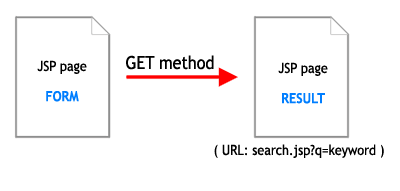
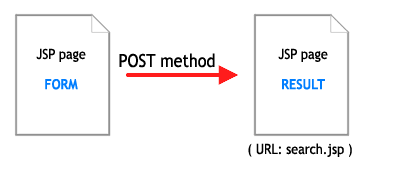
HTML forms only have two ways to pass variables to their target page: GET and POST methods.


POST Method:


Using POST method is sercured by empty URL in address bar. If the result page is result.jsp, URL when POST is only: result.jsp. Wow, nice URL, but, the visitor or user can not reuseable for this URL, and can not simply get the same value when re-access this URL. POST method is best for inserting record to database, but worth for searching or fetching records from HTML forms.


GET Method:


Forms using the GET method send data via the URL. This means that the URL can be copied and revisited at any time. The problem with this method is the format of the parameters. The values in the URL string are ugly, verbose and unfriendly; this is what we are trying to avoid. SEO with GET method is so bad. Almost search engineers like: Google, Yahoo, Live... not love URL generated by GET method.

The Client-Side Solution: Post by JavaScript to result page.

Using javascript with windows.location. In the HTML form, you will create new event for form. When the form is submitted, the function in javascript will be called and tranfer to new page. Script will be following codes:


function getKeyword(){
   q=document.getElementById('query').value;
   window.location = "http://localhost:8080/PostCleanTut/search/"+q;
}

document.getElementById('query').value used for getting value of textfiled inside your search form. After getting the keyword value, script will transfer you to result page(JSP/Servlet) which will be created and rewrited URL yourself. Now, create your new HTML Search form name as searchform.jsp, and it likes following codes:

<html> 
<head>
<title>Search Form</title>
</head>
<body>
     <form action="" onsubmit="getKeyword(); return false;" method="post" name="searchForm" id="searchForm">
        Query: 
        <input type="text" name="query" id="query">
        <input type="submit" name="btnSubmit" id="btnSubmit" value="Submit">
     </form>
</body>
</html>
onsubmit="getKeyword(); return false;" used to call getKeyword() funtion from javacript. When done all thing above, submit your form, data posted will be transfered to result page with example address: http://localhost:8080/PostCleanTut/search/yourkeyword.

The Server-side Solution: Pre-processed by a servlet or JSP self page and send redirect to Result page.

Simply processing with a single jsp or a servlet, you can POST to self jsp page include HTML Form, then send redirect to another page which will be rewrited URL. So, in this article, i will do it with a servlet page by doPost() method. In the pre-processing servlet, doPost() method gets parameter from HTML form, you can clean up by removing unwanted characters. However, this article just do simply to explaint what the servlet do with posting form to clean.
Create your new servlet, name as: SearchProcess.java, codes will be:

package prlamnguyen.servlet;
import java.io.IOException;
import java.io.PrintWriter;
import javax.servlet.ServletException;
import javax.servlet.http.HttpServlet;
import javax.servlet.http.HttpServletRequest;
import javax.servlet.http.HttpServletResponse;
import prlamnguyen.util.StringUtil;
public class SearchProcess extends HttpServlet {
   /**
    * Constructor of the object.
    */
   public SearchProcess() {
      super();
   }

   /**
    * Pre-Processing of Search
    * @param request
    * @param response
    * @throws ServletException
    * @throws IOException
    */
   public void proccessRequest(HttpServletRequest request,
      HttpServletResponse response) throws ServletException, IOException {
      //Get parameter from HTML form
      String q = request.getParameter("query");

      // Clean up by removing unwanted characters if you want
      String newQ = StringUtil.searchInput(q);
      response.sendRedirect(request.getContextPath() + "/search/" + newQ);
   }
   /**
    * The doGet method of the servlet. <br>
    *
    * This method is called when a form has its tag value method equals to get.
    * 
    * @param request the request send by the client to the server
    * @param response the response send by the server to the client
    * @throws ServletException if an error occurred
    * @throws IOException if an error occurred
    */
   public void doGet(HttpServletRequest request, HttpServletResponse response)
      throws ServletException, IOException {

      proccessRequest(request, response);

   }
   /**
    * The doPost method of the servlet. <br>
    *
    * This method is called when a form has its tag value method equals to post.
    * 
    * @param request the request send by the client to the server
    * @param response the response send by the server to the client
    * @throws ServletException if an error occurred
    * @throws IOException if an error occurred
    */
   public void doPost(HttpServletRequest request, HttpServletResponse response)
      throws ServletException, IOException {

      proccessRequest(request, response);

   }
   /**
    * Initialization of the servlet. <br>
    *
    * @throws ServletException if an error occure
    */
   public void init() throws ServletException {
      // Put your code here
   }
}
Above is java class which pre-process and transfer, new servlet which will display result and url will be rewriten have to be created such as name Search.java. Note: you can do it simply by a single jsp to handle and display result, but with a servlet, you can handle data easily by doPost() or doGet() methods, so, it's reason i'm using servlet for this tutorial.
Searching in website is not simply like: where id=?, title=? or onething=?. You should use Full-text Searching, a full-text search allows a search of multiple text columns. If you are setting up a search of a series of articles or a site with lots of product-related content, a MySQL FULLTEXT search can make it very easy to find articles or products related to the keywords used by a searcher. This search method does exactly what its name implies–it allows a full search of large text fields. If you're new to Full-text Search, please follow this link to know how MySQL does with Full-text search.
Following codes bellows are written almost important steps to make search works with URL Rewriter, something like database connection, JNDI...please do it yourself.

Codes of Search.java:


package prlamnguyen.servlet;
/**
* @author Nguyen Duy Lam
*/
import java.sql.Connection;
import java.sql.PreparedStatement;
import java.sql.ResultSet;
import java.sql.SQLException;
import java.util.ArrayList;
import javax.naming.NamingException;
import javax.servlet.ServletContext;
import javax.servlet.ServletException;
import javax.servlet.http.HttpServlet;
import javax.servlet.http.HttpServletRequest;
import javax.servlet.http.HttpServletResponse;
import prlamnguyen.connector.PrlConnection;
import prlamnguyen.model.Article;
public class Search extends HttpServlet {


    Connection con = null;
    PreparedStatement prst = null;
    ResultSet rs = null;
    //Here is my Connection class
    // please create your one class to get connection or write it inside this servlet
    PrlConnection prlcon = null;

    /**
    * Constructor of the object.
    */
    public Search() {
       super();
    }

    /**
    * 
    * @param request
    * @param response
    * @throws ServletException
    * @throws IOException
    */
    public void proccessRequest(HttpServletRequest request, HttpServletResponse response)
        throws ServletException, IOException {
        
        //Init my new connection
        prlcon = new PrlConnection();

        //Display articles in result list in result jsp page which will be created before
        try {
            //Get database connection
            con=prlcon.getConnection();
            //Prepare Statement with Full-text search query, i'm using MySQL.
            prst=con.prepareStatement("SELECT * FROM articles WHERE MATCH(article_title, article_desc, article_content) AGAINST (?)");
            //Get query parameter
            String keyword = request.getParameter("query");
            prst.setString(1, keyword);
            rs=prst.executeQuery();
            ArrayList<Article> articleList = new ArrayList<Article>();

            while(rs.next()){
                Article article = new Article(rs.getInt("article_ID"), rs.getString("article_title"), rs.getString("article_desc"), rs.getString("article_content"));
                articleList.add(article);
            }
            request.setAttribute("keyword", keyword);
            request.setAttribute("articles", articleList);
        } catch (ClassNotFoundException e) {
            
            e.printStackTrace();
        } catch (SQLException e) {
            
            e.printStackTrace();
        } catch (NamingException e) {
            
            e.printStackTrace();
        } finally {
            try {
                if(!con.isClosed()) {
                    con = prlcon.closeConnection(con, prst, rs);
                }
            } catch (SQLException e) {
                
                e.printStackTrace();
            }
        }

        ServletContext context = getServletContext(); 
        context.getRequestDispatcher("/result_search.jsp").forward(request, response); 
    }


    /**
    * The doGet method of the servlet. <br>
    *
    * This method is called when a form has its tag value method equals to get.
    * 
    * @param request the request send by the client to the server
    * @param response the response send by the server to the client
    * @throws ServletException if an error occurred
    * @throws IOException if an error occurred
    */
    public void doGet(HttpServletRequest request, HttpServletResponse response)
        throws ServletException, IOException {

        proccessRequest(request, response); 

    }


    /**
    * The doPost method of the servlet. <br>
    *
    * This method is called when a form has its tag value method equals to post.
    * 
    * @param request the request send by the client to the server
    * @param response the response send by the server to the client
    * @throws ServletException if an error occurred
    * @throws IOException if an error occurred
    */
    public void doPost(HttpServletRequest request, HttpServletResponse response)
        throws ServletException, IOException {
    
        proccessRequest(request, response); 
    
    }


    /**
    * Initialization of the servlet. <br>
    *
    * @throws ServletException if an error occure
    */
    public void init() throws ServletException {
        // Put your code here
    }
}

To display data records, you have to have one data model class. Bellow is one use for above:


package prlamnguyen.model;
/**
* @author Nguyen Duy Lam
*/

public class Article {
    
    private int article_ID;
    private String article_title;
    private String article_desc;
    private String article_content;


    /**
    * @return the article_content
    */
    public String getArticle_content() {
        return article_content;
    }
    
    /**
    * @return the article_desc
    */
    public String getArticle_desc() {
        return article_desc;
    }
    
    /**
    * @return the article_ID
    */
    public int getArticle_ID() {
        return article_ID;
    }
    
    /**
    * @return the article_title
    */
    public String getArticle_title() {
        return article_title;
    }
    

    /**
    * @param article_content the article_content to set
    */
    public void setArticle_content(String article_content) {
        this.article_content = article_content;
    }
    
    /**
    * @param article_desc the article_desc to set
    */
    public void setArticle_desc(String article_desc) {
        this.article_desc = article_desc;
    }
    
    /**
    * @param article_ID the article_ID to set
    */
    public void setArticle_ID(int article_ID) {
        this.article_ID = article_ID;
    }
    
    /**
    * @param article_title the article_title to set
    */
    public void setArticle_title(String article_title) {
        this.article_title = article_title;
    }
    

    public Article() {

    }
    

    /**
    * Article model for search result
    * @param article_ID
    * @param article_title
    * @param article_desc
    */
    public Article(int article_ID, String article_title, String article_desc, String article_content) {
        this.article_ID=article_ID;
        this.article_title=article_title;
        this.article_desc=article_desc;
        this.article_content=article_content;
    }
}

Ok, almost important about bussiness logic are done, to be continue, create new JSP page to display search result. Search.java is a servlet, and when fetched data records, it forward to JSP result page name as result_search.jsp, you have to create this jsp page, something likes this:


<%@ page contentType="text/html; charset=utf-8" language="java" import="java.util.*" errorPage="" %>
<%@ page import="prlamnguyen.model.Article" %>

<% 
    ArrayList articleList = null;
    Iterator iterator;
    Article article;

%>
<html>
<head>
<title>Result search page</title>
</head>
<body>
<p>Search result for: <strong><%=request.getAttribute("keyword") %></strong></p>
<%
    if(request.getAttribute("articles")!=null) {
        articleList = (ArrayList)request.getAttribute("articles");
        request.removeAttribute("articles");
        iterator = articleList.iterator();
        if(articleList.isEmpty()) {
            out.print("<i>Found nothing, sorry ^^!</i>");
        } else {
            out.print("<ul>");
            while ( iterator.hasNext() ) { 
                article = (Article) iterator.next();
                out.print("<li><strong>" + article.getArticle_title() +"</strong><br />");
                out.print("<i>" + article.getArticle_desc() + "</i></li>");
            }
            out.print("</ul>");
        }
    }
%>
</body>
</html>


URL Rewrite


Follow this article to know how to rewrite URL in java, it will guide you step by step how to install URLRewriter and make it work in Java Web Application. When installed, insert into your urlrewrite.xml following codes to make URL rewrite work for search in this tutorial.
Add new rule somewhere between <urlrewrite>..</urlrewrite> tag

<rule enabled="true">
   <from>/search/([^/\.]+)</from>
   <to>/search?query=$1</to>
</rule>
All thing seem to be done, oh, please edit your HTML form. In the Client-side case, form was submitted by javascript, but in Server-side case, please remove onsubmit event, and point action of the form to "<%=request.getContextPath() %>/searchProcess". Example:

<%@ page language="java" pageEncoding="ISO-8859-1"%>

<html> 
<head>
<title>Search Form</title>
</head>
<body>
     <form action="<%=request.getContextPath() %>/searchProcess" method="post" name="searchForm" id="searchForm">
        Query: 
        <input type="text" name="query" id="query">
        <input type="submit" name="btnSubmit" id="btnSubmit" value="Submit">
     </form>
</body>
</html>
Ok, deploy your web application into web server, example url for testing will be http://localhost:8080/PostCleanTut/searchform.jsp
Note: when coding for a search, you have to handle data inputed from user, should replace Statement with PrepareStatement and set parameter for it to avoid SQL Injection
Best Rigard!

©2008 Lam Duy Nguyen